GyroSidecar app icon

iPhone + Mac companion

The missing gyro track for your footage.

GyroSidecar logs your iPhone's gyroscope and accelerometer at 100 Hz while you film in the camera app you prefer — then its free Mac companion syncs a whole shoot day in one click, ready for gyro-based stabilization in your editor.

Coming soon to the App Store See how it works ↓

No account · No analytics · No network access
Film. Sync. Stabilize.

Gyro-based stabilization beats crop-based smoothing — but it needs motion data most camera apps never embed. GyroSidecar records that data alongside any footage, and turns a full day of takes into ready-to-stabilize clips.

1

Film

Start a recording in GyroSidecar, switch to your camera app, and shoot. Logging continues in the background, crash-safe from the first sample — an optional Shortcut can even open your camera app and start the take for you.

2

Sync

Back at your Mac, drop the whole day's folder on GyroSidecar Sync. Clips pair with motion sessions by recording time, the lens is detected per clip, and Sync All aligns every take by its reference audio.

3

Stabilize

Every synced clip gets a ready-to-open project file — open it in Gyroflow, or apply it on your timeline with the Gyroflow OFX plugin in DaVinci Resolve.

A whole shoot day, one click.

The free Mac companion takes the tedium out of sidecars: no manual pairing, no per-clip syncing, no guessing which log belongs to which take.

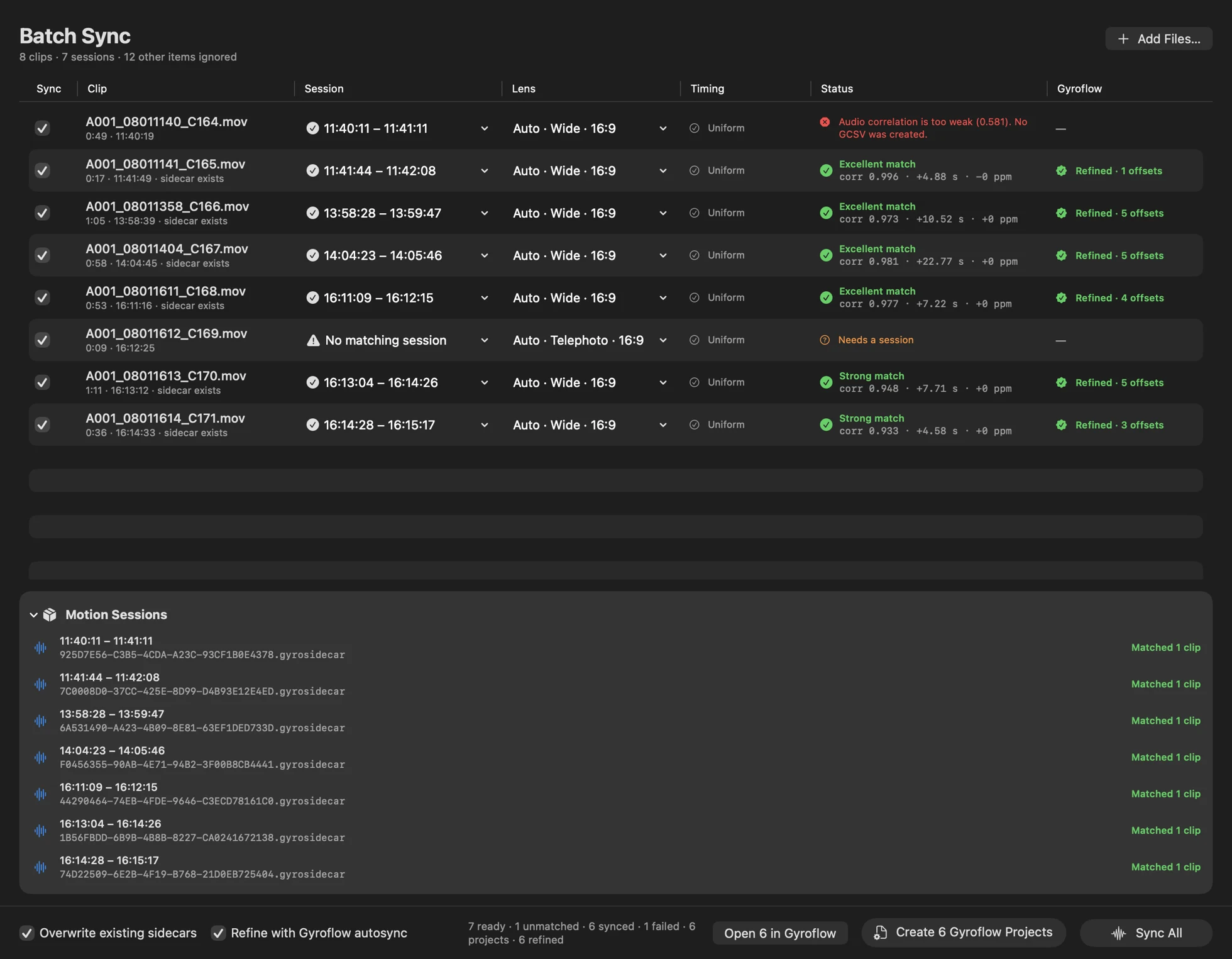
GyroSidecar Sync batch table: eight clips matched to seven motion sessions, six synced with excellent or strong audio correlation and refined Gyroflow projects, one clip without a matching session, and one weak-audio failure with its reason shown
A real shoot day: one orphan clip and one weak-audio take flagged with reasons — everything else synced and refined automatically.
GyroSidecar Sync batch mode empty state inviting you to drop a day of footage
Drop the folder. That's the workflow.

Works with footage from camera apps such as Blackmagic Camera. Autosync refinement uses the free standalone Gyroflow app.

A logger that stays out of the way.

On the phone, GyroSidecar is deliberately boring: one button, dependable background logging, and sessions that take care of themselves.

GyroSidecar Record screen (App Store screenshot coming soon)
GyroSidecar Sessions screen (App Store screenshot coming soon)

App Store screenshots coming soon.

Free · Requires iOS 26.1 or later

Private by design.

No accounts, no analytics, no ads — and no network access at all. Recordings stay on your iPhone until you share them yourself. The App Store privacy label is “Data Not Collected.”

Read the privacy policy →